Azure App Service Multi-Site Dynamic Problem Page & Azure Traffic Manager
When migrating web applications to Azure App Service, full HA/DR across regions isn't always viable — whether due to cost, complexity, or timeline. But leaving users staring at a browser timeout when something goes wrong isn't acceptable either. This post covers a lightweight solution: a dynamic problem page backed by Azure Traffic Manager that gracefully handles failures.
The Architecture
Two components:
- Problem Page App Service — a PHP application hosted in an alternate Azure region (e.g., West Europe when the primary is North Europe) that displays a customised unavailability message per domain
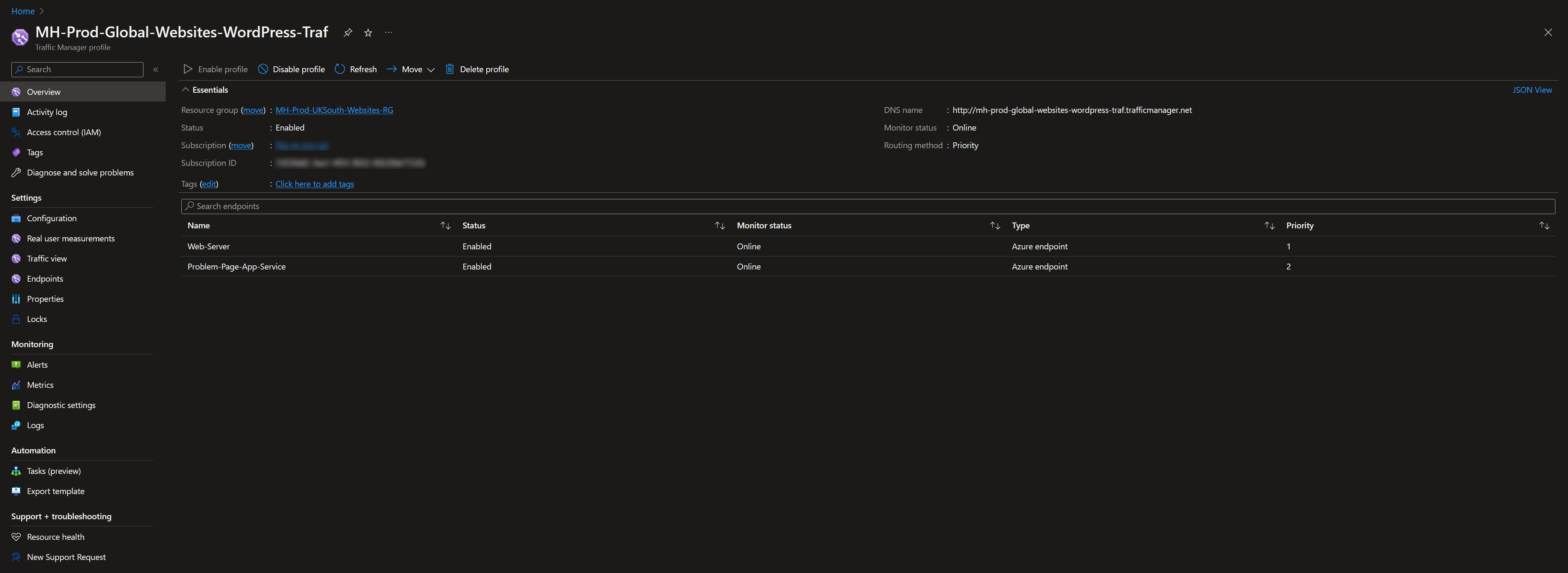
- Azure Traffic Manager — a DNS-based load balancer using priority routing to send traffic to the problem page when the primary endpoint is unhealthy
The Problem Page
The PHP application uses a $sites configuration array mapping each domain to its own message, image, and company name:
$sites = [
  'example.com' => [
    'company'  => 'Example Ltd',
    'message'  => 'We are currently experiencing issues. Please try again shortly.',
    'logo'     => '/img/example-logo.png',
  ],
  'another-site.com' => [
    'company'  => 'Another Site',
    'message'  => 'Scheduled maintenance is in progress.',
    'logo'     => '/img/another-logo.png',
  ],
];

$host   = $_SERVER['HTTP_HOST'] ?? '';
$config = $sites[$host] ?? null;
This means a single App Service instance serves accurate, branded error pages for every domain — no separate deployment per site.

File Structure
PHP logic lives outside the web root to prevent source exposure if PHP fails:
/home/site/
  problem/
    index.php      ← the actual logic
  wwwroot/
    index.php      ← just: <?php include '../problem/index.php'; ?>
    img/
      *.png
NGINX Rewrite
A critical configuration detail: Traffic Manager health probes must receive 200 OK for the endpoint to be considered healthy. Without a rewrite rule, requests to paths that don't exist (which probes often use) return 404, causing Traffic Manager to mark the problem page endpoint as degraded — defeating the entire failover mechanism.
Add this to your NGINX config:
location / {
    try_files $uri $uri/ /index.php?$args;
}
This routes all requests through the PHP script, ensuring probes always get a 200.
Azure Traffic Manager Setup
Profile configuration:
- Routing method: Priority
- Primary endpoint (priority 1): your production web server / App Service
- Failover endpoint (priority 2): the problem page App Service
Use External endpoints for flexibility — you can point to any hostname regardless of whether it's an Azure resource.
Custom headers: Configure the host header on the problem page endpoint to point to its .azurewebsites.net hostname. This is required because App Service uses host-based routing.
DNS: Point each domain's CNAME to the Traffic Manager profile endpoint (e.g., your-profile.trafficmanager.net).
Testing Without Breaking Production
Rather than disabling the primary endpoint to test failover, modify your local hosts file to resolve your domain to the problem page App Service's IP. This lets you verify the correct branded message appears for each domain without touching production traffic.
Result
A cost-effective, always-on safety net: when anything takes down the primary endpoint — regional outage, bad deployment, application crash — users see a helpful, branded page rather than a browser error. And it runs from a single, shared App Service with no per-domain deployments required.